Passport Photo Maker
AI removes the background, you frame the face, and download a single photo or a ready-to-print 4×6 sheet.
Drag to move · scroll or use the slider to zoom · fit the face inside the oval, top of head near the top line
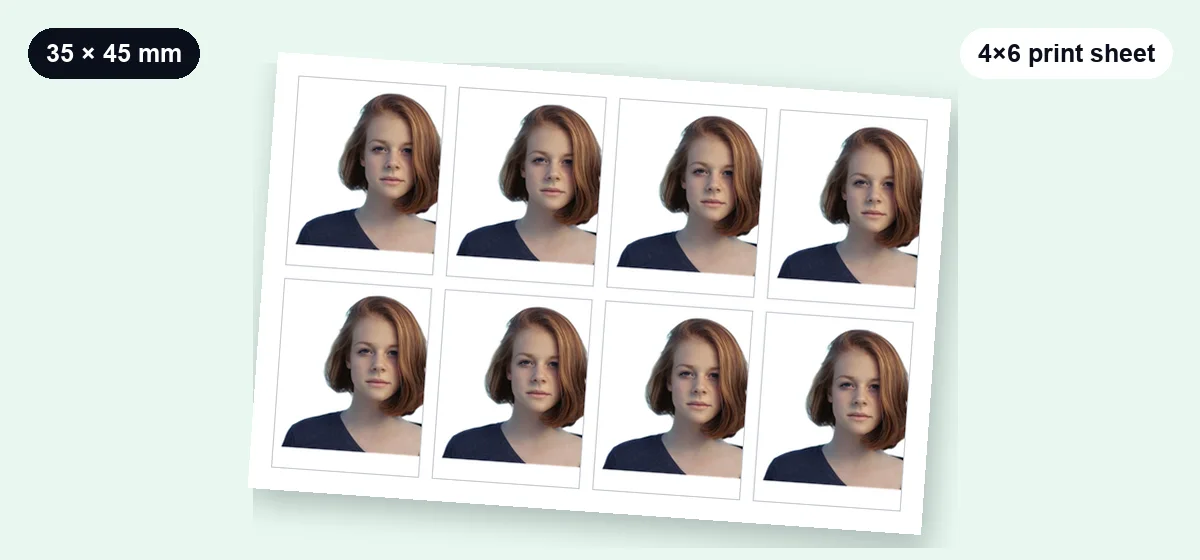
How to make a passport photo online
- Upload a front-facing photo taken in even light against any background.
- The AI removes the background automatically.
- Choose your country size and background color (usually white).
- Drag and zoom until your face fits the oval guide.
- Download a single photo for online applications or a 4×6 sheet to print.
For tips on lighting and common rejection reasons, read our passport photo background guide.
Frequently asked questions
What size is a passport photo?
It depends on the country. 35×45 mm is used by the UK, EU, Pakistan and many others; the USA and India use 2×2 inches (51×51 mm). Always check your government's official requirements.
Can I print the photos at home?
Yes. Download the 4×6 inch sheet and print it at actual size (100%, no "fit to page") on 4×6 photo paper, or take it to any photo print shop.
Is my photo uploaded anywhere?
No. Background removal and cropping happen in your browser. Your photo never leaves your device.
Will my photo be accepted?
We can't guarantee acceptance. Follow your country's rules on lighting, expression, glasses and head size, and change only the background — never your appearance.
Other free photo tools
 AI
AI
Background Remover
Remove the background from any photo with AI and get a transparent PNG.
Open tool → AI
AI
Watermark Remover
Box-select a watermark — AI detects it and keeps refining until it's gone.
Open tool →
Image Resizer
Change width and height in pixels or by percentage, with aspect lock.
Open tool →
Image Compressor
Shrink JPG, PNG and WebP file size with a quality slider, in batches.
Open tool →
Image Converter
Convert JPG ↔ PNG ↔ WebP in batches, keeping transparency.
Open tool →